Step-by-Step User Guide
How to Use Growth Tracking?
Enter height, weight, and head circumference measurements regularly; Babymish interprets them as percentiles according to WHO references and presents development clearly.
QUICK START
Initial Setup and Logging
- If you have more than one baby, select the correct profile from the top.
- Add a new measurement with the + button at top right.
- You can fill any of height, weight, and head circumference fields; entering all at once is not required.
- Each saved measurement is automatically added to history list.
PERCENTILE CARDS
Latest Measurement Interpretation
- Height/weight/head circumference are shown separately on the latest measurement card.
- Each card includes a P value (e.g. P50) and a short status label.
- Color-coded labels provide quick interpretation such as low, below average, normal, above average, and high.
- These interpretations are automatically calculated by WHO age-sex references.
MEASUREMENT ENTRY
Practical Form Experience
- For weight, kg + grams; for height, cm + mm; for head circumference, cm + mm format is used.
- + and - controls next to fields allow quick value adjustment.
- There is a safety check for extremely low head circumference entries.
- You can open and edit an existing measurement to correct wrong entries.
MEASUREMENT HISTORY
Date-Based Tracking
- All records are listed by date, with newest entries on top.
- Each row shows height, weight, and head circumference together.
- Tap a record to open actions; you can edit or delete it.
- With regular entries, you can easily present development history during doctor visits.
WHO REFERENCE TABLE
Detailed View
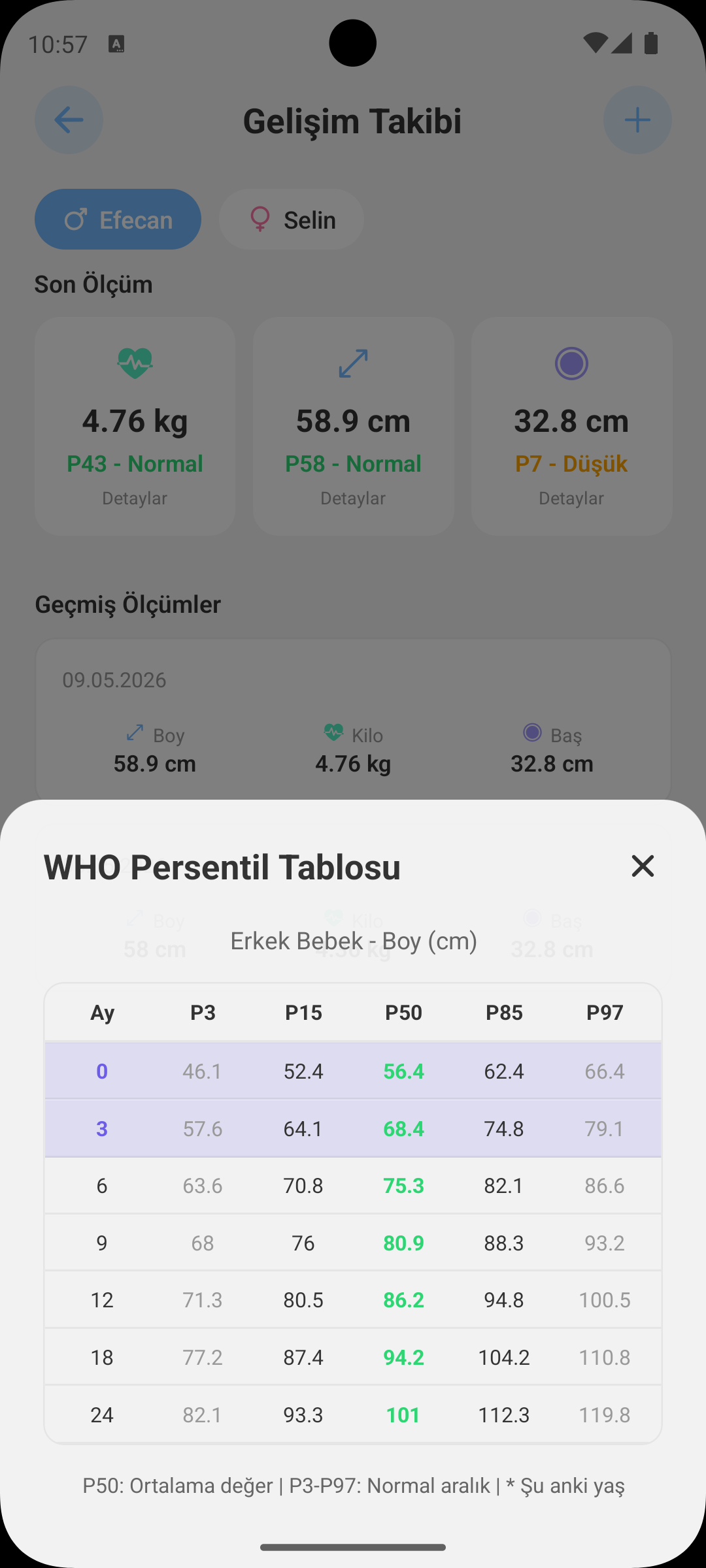
- When you tap height, weight, or head circumference card, related WHO reference table opens.
- Tables are automatically filtered by sex and provide month-based comparison.
- This clarifies not only the "value" but also its age-based position.
WHY IT HELPS
Benefits of Growth Screen
- Helps you detect small development changes early.
- Lets you compare measurements from different dates at a glance.
- Provides an organized and reliable measurement archive during doctor checkups.
- Data-driven tracking helps you make clearer parenting decisions.
GET BABYMISH
Start today, your first entry takes 10 seconds.
Feeding, sleep and diaper logs in one tap. Share with your partner for free.