Step-by-Step User Guide
How to Use Feeding Tracking?
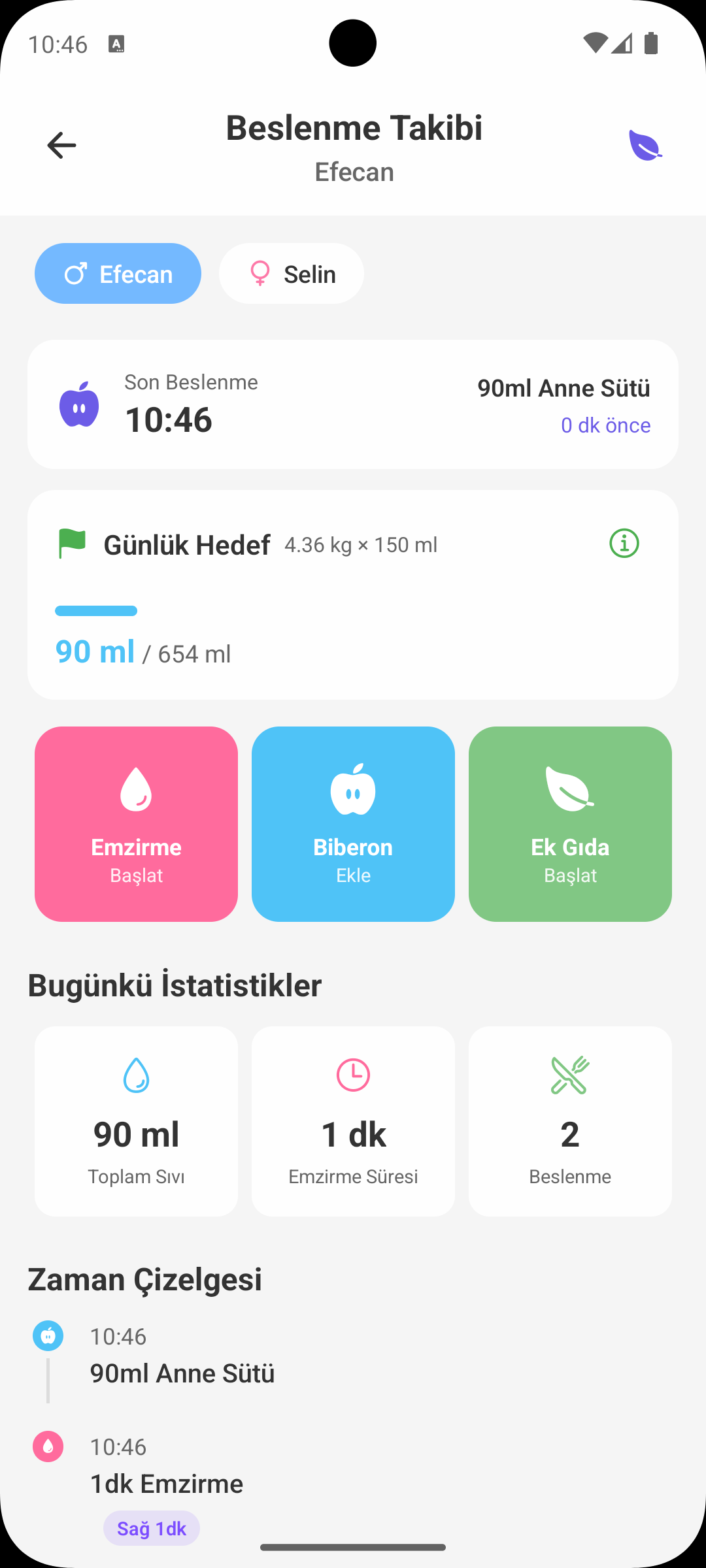
Babymish Feeding screen helps you manage breastfeeding, bottle, solids, daily goals and history in one place. This page explains all features clearly.
QUICK START
What Should I Do First?
- If you have more than one baby, select the correct profile first.
- Choose the current action from quick cards: Breastfeeding, Bottle, or Solid Food.
- As soon as you save a record, it is added to daily stats and timeline automatically.
- The latest feeding card at the top shows the most current status.
BREASTFEEDING
Breastfeeding Tracking
- You can choose left/right side when starting breastfeeding.
- A live timer runs during the session; total minutes are saved automatically when you stop.
- You can switch sides during breastfeeding and track left/right durations separately.
- After saving, the latest breastfeeding info appears on the main card.
BOTTLE
Bottle Record
- Enter amount (ml) and choose milk type (breast milk, formula, etc.).
- Optionally add short notes (e.g. low appetite, drank fast, gas).
- Daily total liquid amount updates automatically after saving.
- All feedings are added to timeline with time details.
SOLID FOOD
3-Day Rule and Reaction Tracking
- When starting a new food, it is tracked day by day for 3 days.
- You can add notes daily, observe, and mark allergy suspicion if needed.
- Foods with no issues can be moved to the safe list.
- Allergic foods are kept in a separate list to reduce retry mistakes.
DAILY GOAL
Daily Feeding Goal
- The app shows daily liquid goal based on latest baby measurements.
- Progress bar shows how close you are to the goal during the day.
- You get a success notification when the goal is reached.
- This section is a strong guide for building a consistent feeding routine.
TIMELINE
History and Organization
- See all breastfeeding, bottle and solid food records in one timeline.
- Each record lists time, type and short description.
- You can delete wrong records with long press and keep the screen clean.
- If too much time passes since last feeding, the UI warns you visually.
WHY IT HELPS
Benefits of the Feeding Screen
- Get clear answers to who fed when and how much in one screen.
- It becomes much easier to show past records during doctor visits.
- Especially in early irregular months, you can track routine without losing control.
- Build a consistent feeding archive for both daily use and long-term development tracking.
GET BABYMISH
Start today, your first entry takes 10 seconds.
Feeding, sleep and diaper logs in one tap. Share with your partner for free.