Step-by-Step User Guide
How to Use Vaccine Tracking?
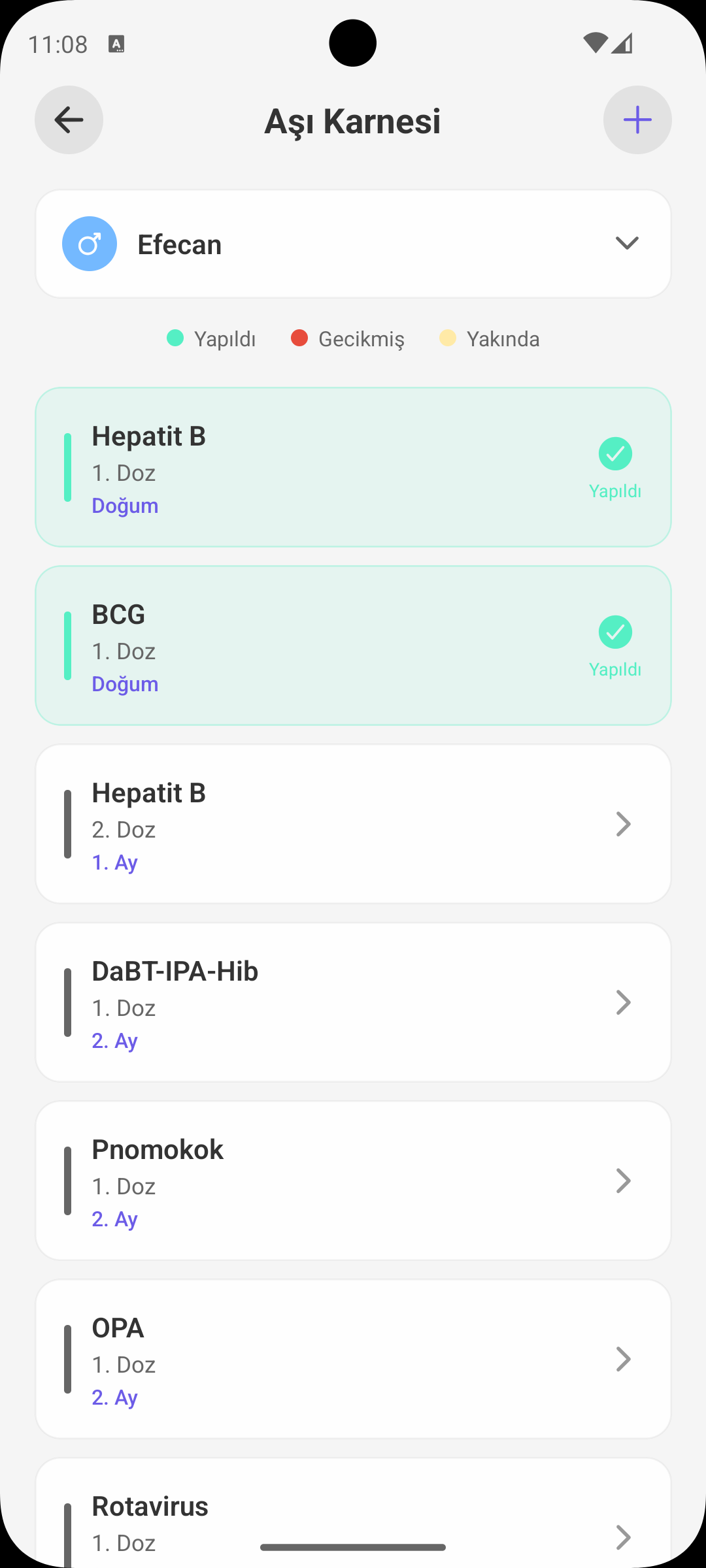
Automatically view your baby's vaccine schedule by age, mark completed vaccines, and manage reminders for upcoming doses on one screen. The schedule is presented based on World Health Organization (WHO) guidance.
QUICK START
How Is the Schedule Created?
- Vaccine list is automatically ordered by baby's date of birth.
- Planning is prepared with reference to World Health Organization (WHO) guidance.
- If you have more than one baby, you can switch profiles from the top and manage schedules separately.
STATUS COLORS
See Vaccine Status Instantly
- Done: Completed doses appear marked.
- Upcoming: Vaccines due soon are highlighted with an attention color.
- Overdue: Past due but incomplete vaccines are indicated separately.
MARKING
Mark Done / Undo Flow
- You can tap a dose and mark it as completed.
- If marked by mistake, you can undo for the same dose.
- This keeps the schedule always up to date and aligned with real status.
REMINDER
Notifications for Upcoming Doses
- The app schedules reminders for incomplete doses.
- When a dose is completed, unnecessary reminders for that dose are removed.
- This way only truly necessary notifications remain.
CUSTOM VACCINES
Adding Extra Vaccine Records
- You can manually add vaccines outside the standard schedule.
- Added records are kept in a separate list and can be deleted from history.
- It provides an organized archive for doctor-recommended special applications.
WHY IT MATTERS
Benefits for Parents
- Reduces the risk of forgetting which dose is due and when.
- Prevents schedule confusion for siblings/twins.
- Provides a clear vaccination history during check-up appointments.
SHORT NOTE
Healthcare Guidance
- The app provides tracking convenience; follow your doctor's recommendation for vaccination decisions and application plan.
- Consult a healthcare professional for national schedule updates or special cases.
GET BABYMISH
Start today, your first entry takes 10 seconds.
Feeding, sleep and diaper logs in one tap. Share with your partner for free.