Step-by-Step User Guide
How to Use Tasks?
Create, prioritize and share baby care responsibilities with family members. No task goes forgotten.
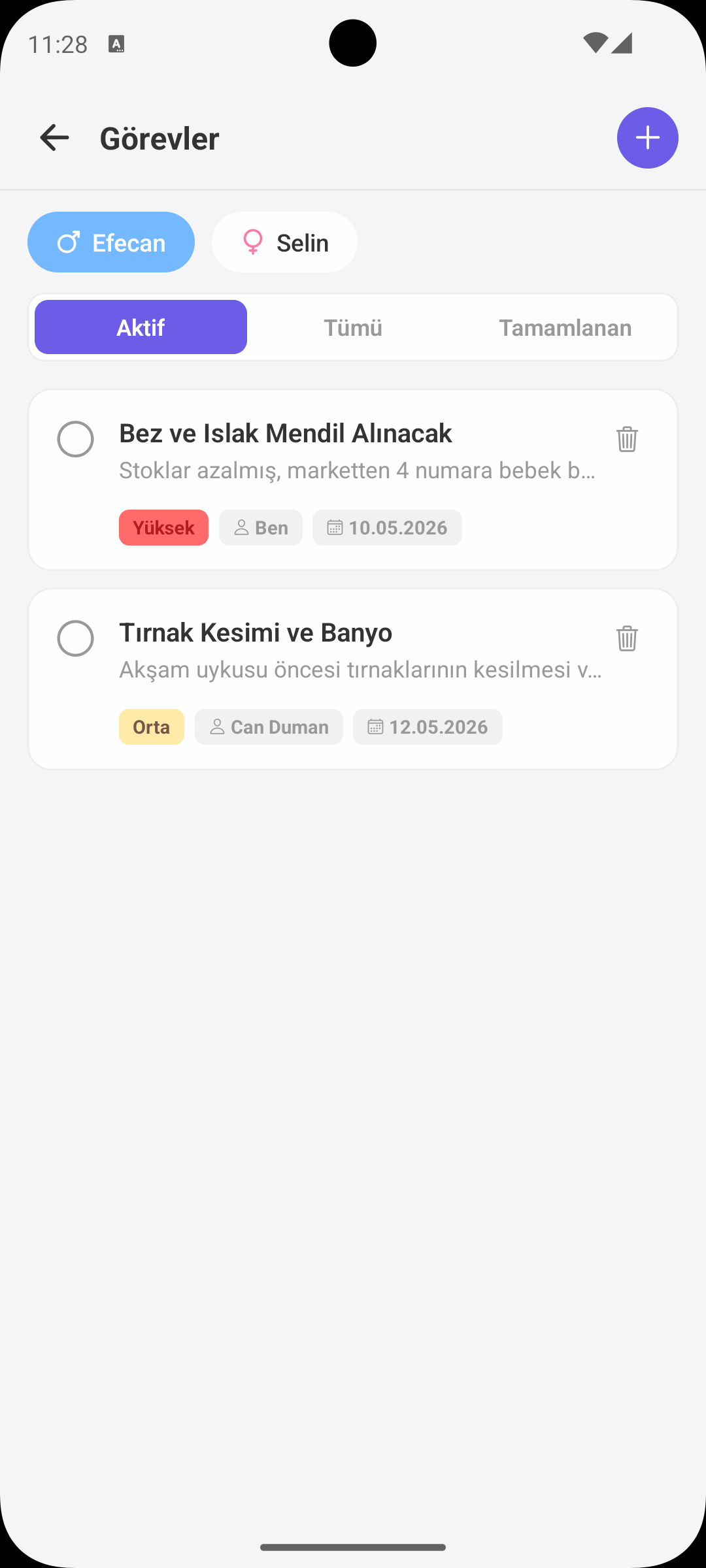
QUICK START
Creating a New Task
- Tap Add Task.
- Enter task name and optional description.
- Select priority level: low, normal, high.
- Set a due date and save.
ASSIGNMENT
Assigning Task to a Person
- When creating a task you can assign it to one of the shared profile members.
- Assigned person receives a notification and sees the task in their list.
- Task sharing balances the load between mothers and fathers.
COMPLETION
Marking a Task as Done
- Tap the task to add a done marker to its right.
- Completed task moves to archive, keeping the list clean.
- Your list also updates when partner completes a task.
REMINDER
Due Date Notifications
- Automatic notifications are sent for tasks with approaching due dates.
- Reminder timing can be set per task.
- Overdue tasks are highlighted with a red label.
WHY IT HELPS
Benefits of the Tasks Screen
- Makes baby care responsibilities visible, strengthening family communication.
- Prevents critical tasks from being forgotten.
- Task archive creates a long-term record of which care activities were done.
GET BABYMISH
Start Today
Manage baby care smartly, store every record with ease.