Step-by-Step User Guide
How to Use Teeth Tracking?
Mark your baby's erupting teeth on an interactive jaw map. Record teething dates and symptoms with a visual timeline.
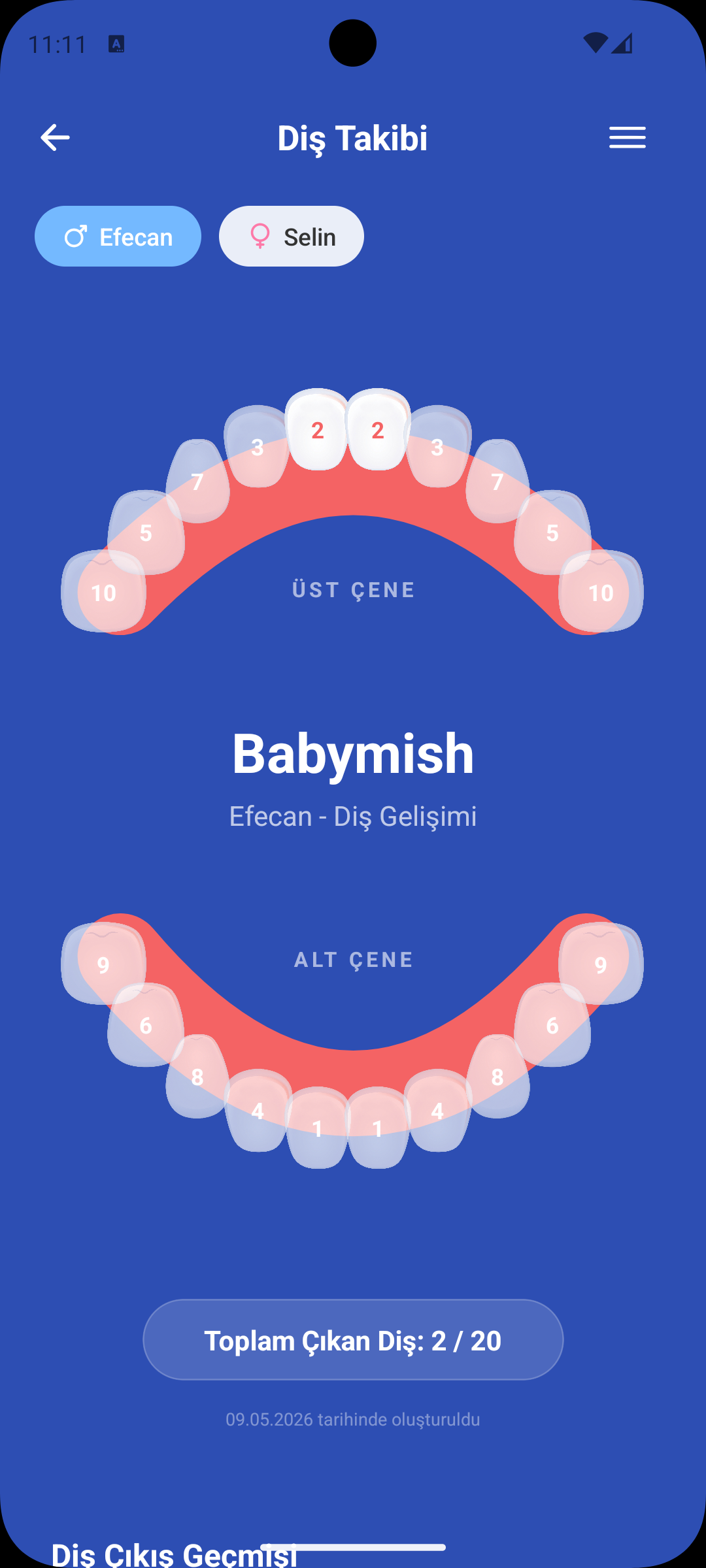
QUICK START
First Tooth Record
- On the Teeth Tracking screen, you see an interactive mouth/jaw map.
- Tap the erupted tooth and save by selecting the date.
- The recorded tooth is highlighted on the map and added to the timeline.
JAW MAP
Visual Teeth Tracking
- All 20 primary teeth are shown separately for upper and lower jaw.
- Erupted teeth are marked green, pending ones grey.
- At a glance you can see how many teeth erupted and how many are waiting.
SYMPTOM LOG
Teething Symptoms
- Add symptoms to each tooth record: fussiness, drooling, fever, biting, etc.
- Symptoms are tracked separately per tooth.
- It becomes easier to pattern baby behaviors during teething periods.
TIMELINE
Teething Dates
- All tooth records appear in chronological order in the list.
- You can quickly recall when each tooth erupted.
- This information also serves as reference for the first dentist visit.
WHY IT HELPS
Benefits of Teeth Tracking
- Navigate teething period with less stress through systematic logging.
- Symptom history prepares you for similar future periods.
- Easily share development progress with partner or family via the visual map.
GET BABYMISH
Start Today
Manage baby care smartly, store every record with ease.