Adım Adım Kullanım Rehberi
Uyku Takibi Nasıl Kullanılır?
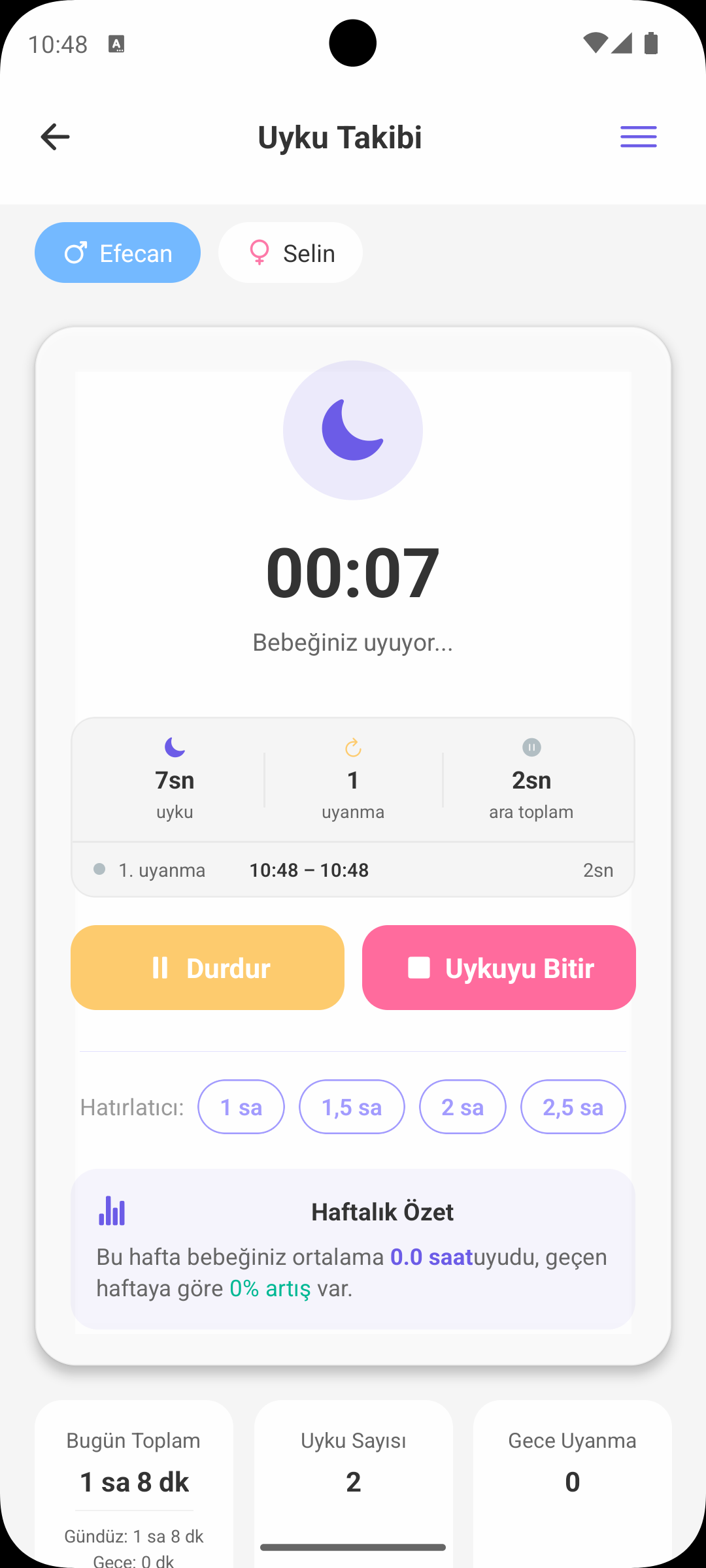
Babymish Uyku ekranı; gündüz uykusu, gece uykusu, duraklat-devam ettir, uyku hatırlatıcıları ve haftalık özetleri tek ekranda yönetmeniz için tasarlandı.
HIZLI BAŞLANGIÇ
Uyku Kaydı Başlatma
- Bebek seçimi yaptıktan sonra Gündüz Uykusu veya Gece Uykusu başlatabilirsiniz.
- Uyku başlar başlamaz canlı sayaç devreye girer.
- Partner cihazlara "uyuyor" bildirimi gönderilir, böylece herkes aynı durumdan haberdar olur.
- Uygulama kapansa bile aktif uyku durumu korunur ve geri açıldığında devam eder.
AKTİF UYKU KONTROLÜ
Duraklat, Devam Ettir, Bitir
- Kısa aralarda uyku kaydını duraklatıp sonra devam ettirebilirsiniz.
- Duraklatılan süreler toplam uyku süresinden otomatik düşülür.
- Bitirme anında toplam dakika net olarak hesaplanır ve kayıt edilir.
- Bu model özellikle sık uyanıp tekrar uyuyan bebeklerde daha doğru veri sağlar.
UYKU HATIRLATICISI
Zamanlı Uyarılar
- Aktif uykuda 1 saat, 1.5 saat, 2 saat, 2.5 saat gibi hatırlatma seçenekleri seçebilirsiniz.
- Tek dokunuşla hatırlatıcı açılır; tekrar dokunursanız kapanır.
- Bu sayede uzun uykuları kontrollü takip edip günlük rutine daha iyi uyum sağlayabilirsiniz.
HAFTALIK ÖZET
Uyku Trendleri
- Haftalık ortalama uyku süresi otomatik hesaplanır.
- Geçen haftaya göre artış/azalış yüzdesi gösterilir.
- Gece uyanma sayısı ayrıca raporlanır.
- Bu metrikler düzen değişikliklerini erken fark etmenizi kolaylaştırır.
GEÇMİŞ KAYITLAR
Zaman Çizelgesi Mantığı
- Her kayıt için başlangıç-bitiş saati, toplam süre ve uyku tipi görünür.
- Duraklatma araları (pause) kayıt detayında ayrıca listelenir.
- Not etiketi kullanıldıysa (ör. beslenme sonrası, huzursuz) kaydın üzerinde gösterilir.
DÜZENLEME VE MANUEL EKLEME
Esnek Kayıt Yönetimi
- Kaçırdığınız bir uykuyu sonradan manuel olarak ekleyebilirsiniz.
- Yanlış kayıtları düzenleyebilir veya silebilirsiniz.
- Başlangıç ve bitiş saatleri güvenli şekilde kontrol edilir; hatalı giriş engellenir.
ÖNERİLEN UYKU TABLOSU
Yaşa Göre Rehber
- Ekrandaki bilgi modalında yaş aralığına göre önerilen toplam uyku ve gündüz uyku sayısı yer alır.
- Bu tablo bir teşhis aracı değil, rutin planlaması için ebeveyne yol gösteren pratik bir referanstır.
NEDEN İŞİNİZE YARAR?
Uyku Ekranının Size Faydası
- Gece-gündüz dengesini daha net görür, rutini daha sağlıklı kurarsınız.
- Uyku bozulmalarını haftalık trendden erken fark edersiniz.
- Doktor görüşmelerinde somut ve düzenli uyku geçmişi paylaşabilirsiniz.
BABYMISH’İ EDİNİN
Bugün başlayın, ilk kaydınız 10 saniye.
Beslenme, uyku ve bez kayıtları tek dokunuşta. Eşinizle ücretsiz paylaşın.