Adım Adım Kullanım Rehberi
Ateş ve Semptom Takibi Nasıl Kullanılır?
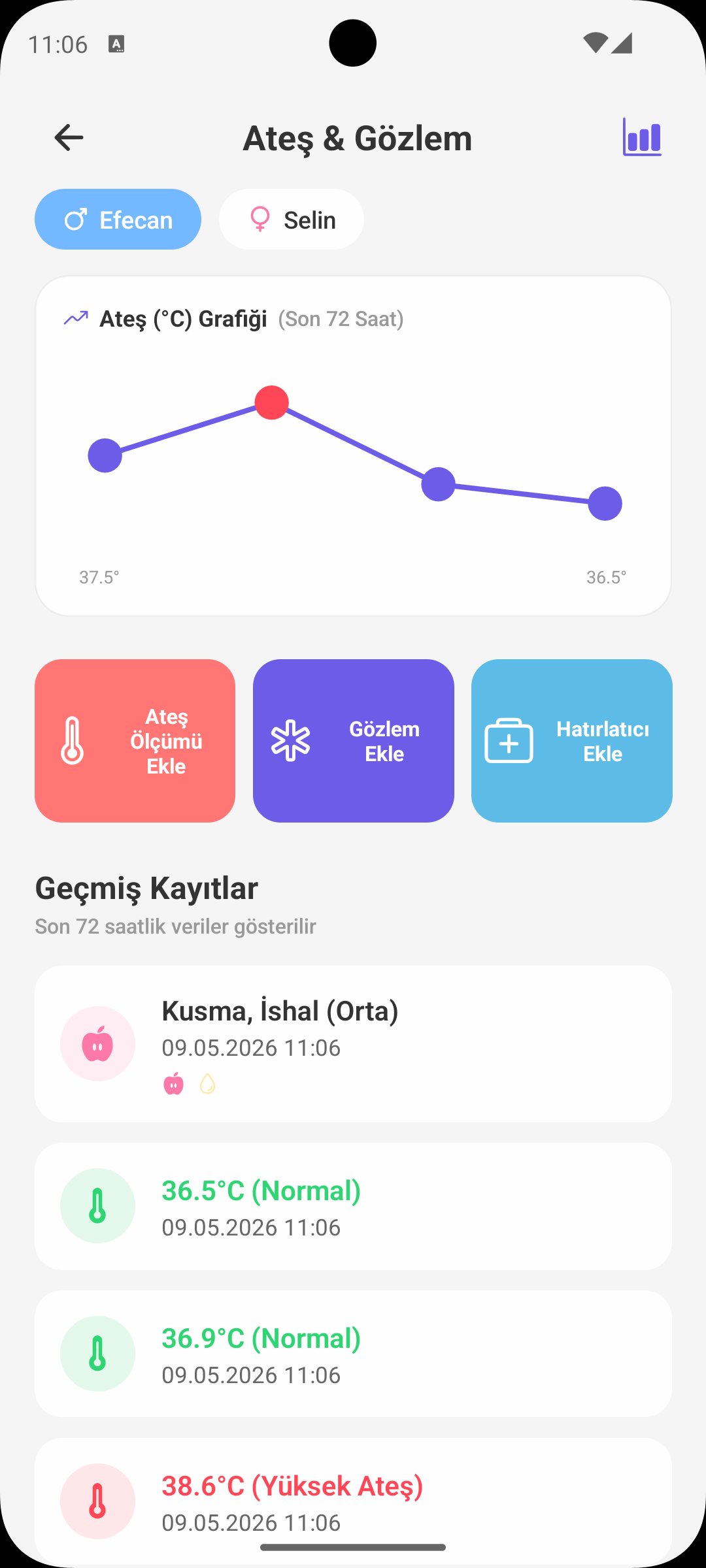
Ateş ölçümlerini, semptomları ve ilaç kullanımını tek ekranda takip edin. Böylece hem gün içi durumu hem de son 72 saatin genel seyrini net biçimde görürsünüz.
HIZLI BAŞLANGIÇ
Hangi Kayıdı Gireceğim?
- Ekranda üç kayıt türü bulunur: Ateş, Semptom, İlaç.
- İhtiyacınıza göre ilgili formu açıp birkaç adımda kayıt oluşturabilirsiniz.
- Tüm kayıtlar tarih-saat bilgisiyle tek listede birleşir.
ATEŞ KAYDI
Doğru Ölçüm Takibi
- Ateş değeri ondalıklı olarak girilir (ör. 38.2°C).
- Uygulama çok düşük/yüksek uç değerleri kontrol ederek hatalı girişi önlemeye yardımcı olur.
- Yeterli veri olduğunda son ölçümlerden ateş trend grafiği oluşturulur.
SEMPTOM KAYDI
Belirti + Şiddet
- Öksürük, burun akıntısı, kusma, ishal, huzursuzluk gibi semptomları seçebilirsiniz.
- Her semptom kaydında şiddet seviyesi belirlenebilir: düşük, orta, yüksek.
- Gerekirse not alanına gün içi gözleminizi ekleyin.
İLAÇ KAYDI
Doz ve Hatırlatma
- İlaç adı, doz bilgisi ve saat kaydedilir.
- İsterseniz ilaç için otomatik hatırlatma açabilirsiniz (ör. 4 saatte bir).
- Aktif hatırlatmalar ekrandan kapatılabilir veya güncellenebilir.
GEÇMİŞ KAYITLAR
Son 72 Saat Görünümü
- Semptom ve ilaç kayıtları zaman sırasına göre listelenir.
- Her kayıtta tür, saat, içerik ve not bilgisi görünür.
- Kayıda dokunarak düzenleme veya silme işlemi yapabilirsiniz.
NEDEN ÖNEMLİ?
Takibin Sağladığı Faydalar
- Belirtilerin ne zaman başladığını ve nasıl değiştiğini net görürsünüz.
- İlaç veriliş saatlerini karıştırmadan ilerlersiniz.
- Doktorla görüşürken olay akışını somut kayıtlarla paylaşabilirsiniz.
KISA NOT
Güvenli Kullanım Hatırlatması
- Uygulama takip ve düzen amacıyla destek sunar; tıbbi teşhis yerine geçmez.
- Yüksek ateş, uzayan semptom veya genel durum bozulmasında sağlık profesyoneline başvurun.
BABYMISH’İ EDİNİN
Bugün başlayın, ilk kaydınız 10 saniye.
Beslenme, uyku ve bez kayıtları tek dokunuşta. Eşinizle ücretsiz paylaşın.