Adım Adım Kullanım Rehberi
Ebeveyn Paylaşımı Nasıl Kullanılır?
Bebek profilini eşinizle güvenli şekilde paylaşın, davetleri yönetin ve tüm kayıtları iki taraf için senkron tutun. Böylece bakım sorumluluğu tek kişide birikmez.
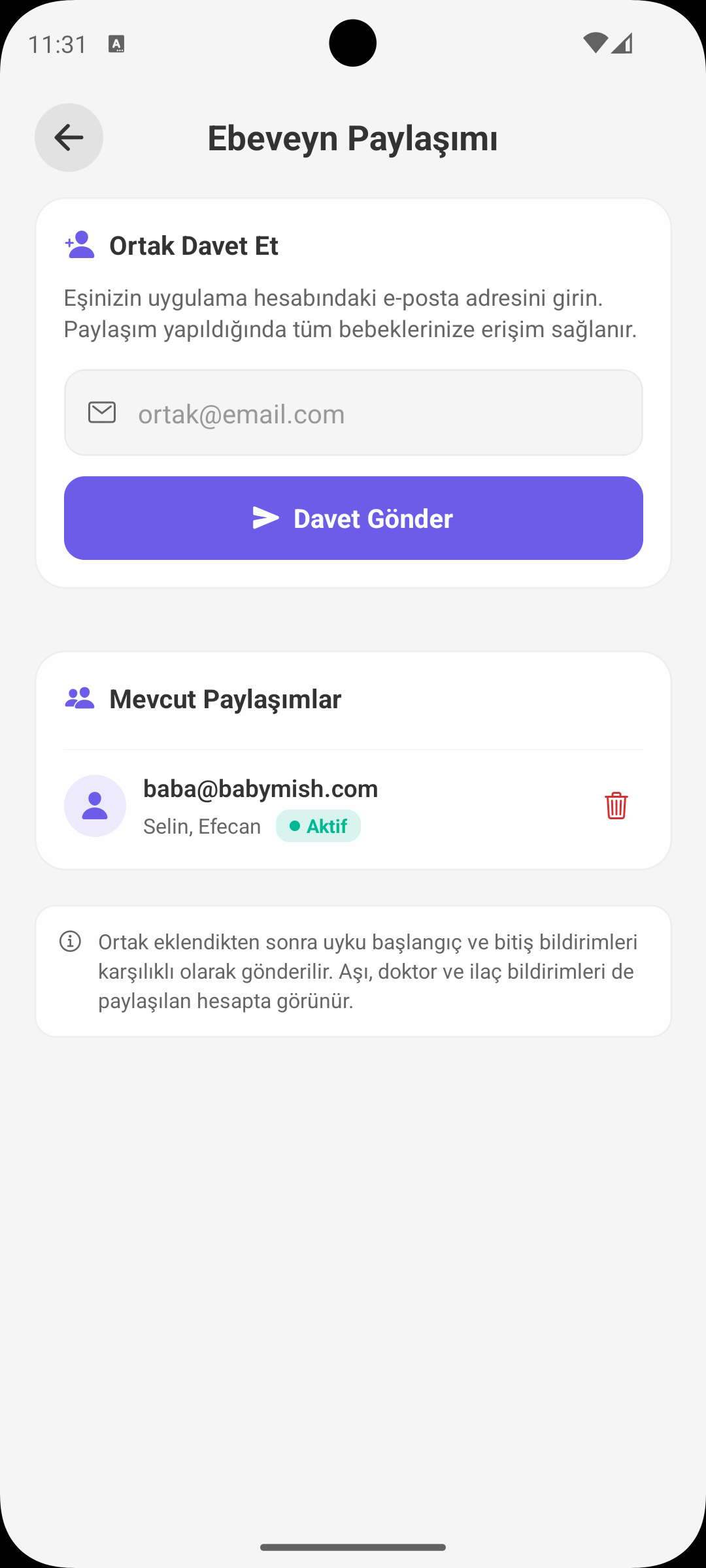
DAVET GÖNDERME
E-posta ile Paylaşım Başlat
- Anne hesabı tarafında, partner e-postası girilerek davet gönderilir.
- Sistem kendi e-postanıza davet gönderimini engeller.
- Davet bekleyen durumunda listede görünür.
DAVET YÖNETİMİ
Kabul / Reddet Akışı
- Partner hesabında gelen davetler ayrı bölümde görünür.
- Kabul edildiğinde paylaşım aktifleşir ve hesaplar eşleşir.
- Reddedilen davet sistemden kaldırılır.
AKTİF PAYLAŞIMLAR
Kimlerle Bağlantı Var?
- Mevcut paylaşım listesinde partner e-postası ve durum etiketi görünür.
- Hangi bebek profillerine erişim olduğu listede belirtilir.
- Gerekirse paylaşım tek dokunuşla kaldırılabilir.
ROL MANTIĞI
Anne / Baba Deneyimi
- Anne tarafında davet gönderme ve paylaşım yönetimi ağırlıktadır.
- Baba tarafında gelen davetleri onaylama ve paylaşılan hesapları görme öne çıkar.
- Bu yapı, karışıklık olmadan görev dağılımını netleştirir.
SENKRON ÇALIŞMA
Aynı Veriye Erişim
- Beslenme, uyku, sağlık ve görev kayıtları iki tarafta da güncel görünür.
- Gece bakımında "kim ne yaptı" belirsizliği azalır.
- Acil durumlarda son kayıt geçmişine her iki ebeveyn de ulaşabilir.
NEDEN FAYDALI?
Aile İçin Somut Kazanım
- Bebek takibini tek kişiye bağlı olmaktan çıkarır.
- İletişim kazalarını ve tekrar eden işleri azaltır.
- Daha dengeli, sürdürülebilir ebeveyn iş birliği sağlar.
KISA NOT
Güvenli Kullanım
- Paylaşımı yalnızca güvendiğiniz ve aktif kullanan hesaplarla yapın.
- İhtiyaç bittiğinde erişimi kaldırarak veri görünürlüğünü güncel tutun.
BABYMISH’İ EDİNİN
Bugün başlayın, ilk kaydınız 10 saniye.
Beslenme, uyku ve bez kayıtları tek dokunuşta. Eşinizle ücretsiz paylaşın.